Your Universal Remote Control Center
RemoteCentral.com
iOS & Android Remote Apps Forum - View Post
Previous section Next section Previous page Next page Up level
Up level
The following page was printed from RemoteCentral.com:

Login:
Pass:


Page 2 of 2
Topic:
Remote Control II - beware
This thread has 23 replies. Displaying posts 16 through 24.
Post 16 made on June 30, 2005 at 06:50
F
FrankW
Long Time Member
Joined:
Posts:
June 2003
19
Hi Flemming,

here some direct links:

WinCESoft: www.WinCESoft.de
Some skin files (incl. VGA skin): [Link: wincesoft.de]

Some RC II- HowTo's:
How to Create New Button Layouts: [Link: wincesoft.de]
How to Create Macros: [Link: wincesoft.de]
How to Assign Device Keys:[Link: wincesoft.de]
How to Call External Applications: [Link: wincesoft.de]

Frank

Post 17 made on August 28, 2005 at 08:31
K
kruuzer
Lurking Member
Joined:
Posts:
August 2005
1
Hi,

Does anybody know how to use CCF files in Remote Control II?

I couldn't find it on their website.

Thanx!

kruuzer

Post 18 made on August 31, 2005 at 15:36
R
rsbrux
Long Time Member
Joined:
Posts:
June 2005
63
On 08/28/05 09:31 ET, kruuzer said...
Does anybody know how to use CCF files in Remote
Control II?

You can't use CCF layouts, you can only use the IR codes. See the earlier messages in this thread.
Regards,
rsbrux
Post 19 made on October 23, 2005 at 20:52
R
rciiuser
Lurking Member
Joined:
Posts:
October 2005
6
I am using an Axim x51v
When using a single button or a single line in a macro turning on the power to my Daewoo monitor works fine. However using a macro with multiple commands the power on or off does not work on the Daewoo, the other commands in the macro work fine.
Any suggestions?
Post 20 made on October 26, 2005 at 08:27
F
FrankW
Long Time Member
Joined:
Posts:
June 2003
19
On 10/23/05 21:52 ET, rciiuser said...
I am using an Axim x51v
When using a single button or a single line in
a macro turning on the power to my Daewoo monitor
works fine. However using a macro with multiple
commands the power on or off does not work on
the Daewoo, the other commands in the macro work
fine.
Any suggestions?

I assume that the power command is disturbed by the folowing IR- command.
I suggest to add a wait- time of 200ms after this command in the macro- list:
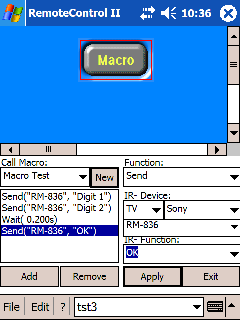

[Link: wincesoft.de]

Frank
www.WinCESoft.de

Post 21 made on November 3, 2005 at 23:01
R
rciiuser
Lurking Member
Joined:
Posts:
October 2005
6
I tried .2 to 10s and it still does not work in a macro but works fine on its own, I have tried putting the command at the top of the macro, middle and end. ????
Post 22 made on December 19, 2005 at 09:48
Z
zephyre
Lurking Member
Joined:
Posts:
December 2005
8
Ok you cannot use CCF files on Remote Control 2. Regardless of how "restrictive" and/or "buggy" they may be, they seem to be the method of choice for distributing codes here.

Ok, so how do we convert a .CCF file to a .IR so that this thing can actually import codes found on this forum?

Thanks!
Jon

Post 23 made on November 16, 2007 at 21:57
B
Boomer
Lurking Member
Joined:
Posts:
November 2007
2
I love this program, Its very adictive to program and mess with.. I have taken the skin PatrickB_VGA_V1 which is an incredible design and I have modified it like crazy to work for me.. added pages, moved keys, reprogramed keys, fixed keys and all sorts of things.. there is so much i have yet to even play with yet.. but from the look of how i moded this skin, I have learned a lot and quickly just by messing with it.. i have yet to try to add BMPs so im not sure how yet but i want to find and add TV Chan pictures for US TV.. any help anyone could give, or push me in the right direction on how to find them and add them
Post 24 made on November 16, 2007 at 22:01
B
Boomer
Lurking Member
Joined:
Posts:
November 2007
2
also how do i make PNG's and is there a way i can make a macro set to open another project.. I fear I might be at the page max and if I can use a buttion to switch between Projects i can just make add a whiole lot more to it
Page 2 of 2

Jump to


Protected Feature Before you can reply to a message...
You must first register for a Remote Central user account - it's fast and free! Or, if you already have an account, please login now.

Please read the following: Unsolicited commercial advertisements are absolutely not permitted on this forum. Other private buy & sell messages should be posted to our Marketplace. For information on how to advertise your service or product click here. Remote Central reserves the right to remove or modify any post that is deemed inappropriate.