|
 |
|
|
Older Software - Philips ProntoEdit NG v1.2 For: Philips Pronto NG | OLD VERSION New features include the ability to use all four hard buttons below the screen, movable system objects, PCF file merging, group moving, increased speed and much more. |
|
|
Older Software - Philips ProntoEdit NG v1.2.6 For: Philips Pronto NG | OLD VERSION Updated with a CCF IR code scrubber to improve importing. This software package is designed only for use with the Pronto "NG" remote control. ProntoEdit NG works with a new PCF file format, but will import older CCF files. Includes emulator. |
|
|
Older Software - Philips ProntoEdit NG v2.0.6 For: Philips Pronto NG | OLD VERSION Numerous editor updates and new features: support for PNG images, multi-line text labels with alignment control, improved IR code learning, better PCF merge functionality, functional punchthroughs, more right-click menus, plus an advanced HEX code import scrubber. Requires firmware v3.1.13. |
|
|
Older Software - Philips ProntoEdit NG v2.0.9 For: Philips Pronto NG | OLD VERSION Changes to this version include improved IR code learning. Requires firmware v3.1.5. |
|
|
Older Software - Philips ProntoEdit NG v2.1.1 For: Philips Pronto NG | OLD VERSION Changes to this version include a new IR code duration setting; files will upload and download up to 40% faster; opening of files will be up to twice as quick; support for Windows Media Center Edition and Somfy IR codes; direct input of RC5, RC6 & RCMM codes; faster gallery performance. Requires firmware v3.6.7. |
|
|
Older Software - Philips ProntoEdit NG v3.0.8 For: Philips Pronto NG | OLD VERSION For use only with the Philips Pronto NG TSU3000 and SBC-RU950 remote controls. Now based on major changes and bug fixes made in PPENG2: improved performance and stability (files load up to 30 times faster); new shortcut keys and menus; graphical linking and improved button-to-button copying; button alignment and spacing tools; redesigned IR code screens with IR duration; image extraction; plus other usability improvements. Requires firmware v3.6.7. |
|
|
Philips ProntoNG - Philips ProntoEdit NG For: Philips Pronto NG | PENG v3.1.3 For use only with the Philips Pronto NG TSU3000, TSU3500, SBC-RU950 & SBC-RU960 remote controls. Includes all of the major enhancements made in v3.0.8, plus support for the TSU3500. Requires firmware v3.9.8. |
|
|
Philips ProntoNG - TSU3000 Connection Problems For: Philips Pronto NG | A Microsoft Word document that explains why some users may be unable to connect to the Pronto TSU3000 under ProntoEdit NG, and how to correct the situation. |
|
|
PCF Programs - Button Maker For: Philips Pronto NG By: Richard Strudwick | v3.0 Button Maker - create buttons for use in ProntoEdit. Also included is my configuration file so you can see how I have made use of it. |
|
|
PCF Programs - PCF Switcher For: All Models By: Daniel Tonks | v0.3 Tired of being unable to load PCF files not created by your remote�s particular software without first manually editing the comment section? PCF Switcher to the rescue! In the tradition of Pronto.ini Wizard and CCF Picker, this utility is designed to make transporting PCF files between the Philips ProntoEdit NG and Marantz Wizz.it packages easier, by automatically editing any PCF�s comment section with the correct version number for your software. In addition, PCF Switcher will also make a minor change to the XML code (if necessary) so that objects display correctly in Marantz Wizz.it. |
|
|
BenQ Projector PB6210 For: Philips Pronto NG By: Sinclair | This file works with the latest firmware & ProntoEdit software (tested with TSU3000). Earlier firmware versions weren't able to learn the codes correctly. |
|
|
|
|
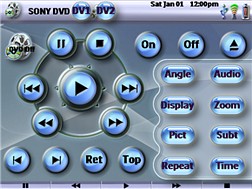
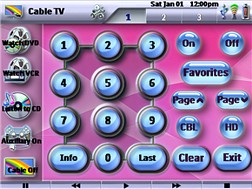
For: Pronto TSU9600 By: Blaez | Blaez's Device Based XCF File If you were previously using a remote like the Pronto TSU2000, which we were using before upgrading to the TSU9600, then you may have gotten used to going to individual devices that were actually the remotes for the equipment in your system. This system XCF file is based on running all devices with macros, but having a remote available for fine tuning all aspects of the device being used, as well as using buttons to get back and forth between devicess, like Cable and TV. All device remotes can also easily be accessed from a menu page of Devices on the Home Menu. There is an included Help File that explains the remote's use and functions to all users. Elements used were simply from the ProntoEdit Professional program and the "onlyoneremote.com" web site. |
|
|
Older Software - Philips ProntoEdit Professional v1.0.37 For: Pronto TSU9600 | OLD VERSION PC configuration editing software for use with the Philips Pronto Professional TSU9600 color control panel. Changes to this version include more Escient music server customization, improved channel wizard, longer text labels, user interface improvements, plus minor bug fixes. Requires remote firmware v1.3.4 and extender firmware v1.0.33. |
|
|
Older Software - Philips ProntoEdit Professional v1.1.0 (TSU9400) For: Pronto TSU9400 | OLD VERSION PC configuration editing software for use with the Philips Pronto Professional TSU9400 color control panel. This is the first official release. Requires remote firmware v3.0.15. |
|
|
Older Software - Philips ProntoEdit Professional v1.1.20 (TSU9600) For: Pronto TSU9600 | OLD VERSION PC configuration editing software for use with the Philips Pronto Professional TSU9600 color control panel. Changes to this version include ProntoScript support, addition of Xiva-based sound server integration, MCE music integration, Escient Fireball DVD and music manager integration, increased album art size, an IR code database update, and Windows Vista compatibility. Requires remote firmware v1.4.28 and extender firmware v1.1.36. |
|
|
More results: [ < Back | Next > ]
Return to the index of all files. |










