
The following page was printed from remotecentral.com:
Before you continue!This file area has been replaced with a newer one! This section is no longer being updated and is presented for archival purposes only. As it becomes increasingly out of date, some files may show as unavailable. For free access to all of these downloads and many newer ones, visit our NEW file area at: http://files.remotecentral.com
You are currently browsing through the Philips Pronto NG TSU3000, TSU3500, RU950, RU960, ProntoPro NG TSU7000, TSU7500, RU980, RU990, Marantz RC5400 & RC9500 file area. To return to the beginning click here. |
|
[ < Back | Next > ]
[ Page: 1 ] |
Sort by: [ Title | Date | Author ] |
|
|
Humax Digital Video Recorder DRT800 For: Philips Pronto NG By: Jonathan Schalliol | Part of a complete system PCF file. |
|
|
Lutron Lighting Spacer For: Philips Pronto NG By: Jonathan Schalliol | Part of a complete system PCF file. |
|
|
Slim Devices Media Player SqueezeBox For: Philips Pronto NG By: Jonathan Schalliol | Part of a complete system PCF file. |
|
|
Sony CD Player CDP-XA3ES For: Philips Pronto NG By: Jonathan Schalliol | Part of a complete system PCF file. |
|
|
Sony Receiver STR-DA3100ES For: Philips Pronto NG By: Jonathan Schalliol | Part of a complete system PCF file. |
|
|
Sony Television KV-27XBR45 For: Philips Pronto NG By: Jonathan Schalliol | Part of a complete system PCF file. |
|
|
Sony VCR SLV-960HF (Remote model RMT-V158C) For: Philips Pronto NG By: Jonathan Schalliol | Part of a complete system PCF file. |
|
|
X-10 Lighting IR543 For: Philips Pronto NG By: Jonathan Schalliol | Part of a complete system PCF file. |
|
|
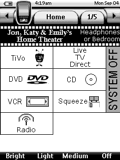 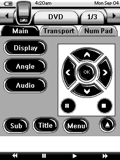
For: Philips Pronto NG By: Jonathan Schalliol | Jonathan Schalliol's System A complete system featuring a keyboard for the SlimDevices SqueezeBox and Macros for setting of inputs on three zones. Thanks to johnsfine and Bruce Hartly for all the assistance. |
|
|
Return to the index of all files,
or search for even more files by this author. |
|
|
Share with the remote control community
by uploading a file to Remote Central!
| 









