
The following page was printed from remotecentral.com:
Before you continue!This file area has been replaced with a newer one! This section is no longer being updated and is presented for archival purposes only. As it becomes increasingly out of date, some files may show as unavailable. For free access to all of these downloads and many newer ones, visit our NEW file area at: http://files.remotecentral.com
You are currently browsing through the Philips Pronto & ProntoPRO, Marantz RC5000, RC5200 & RC9200, Onkyo CHAD and Yamaha RAV-2000 file area. To return to the beginning click here. |
|
[ < Back | Next > ]
[ Page: 1 ] |
Sort by: [ Title | Date | Author ] |
|
|
Cambridge Audio CD Player CD4 For: Philips TS-1000 By: Marc Burge | Part of a complete system CCF file from the UK. |
|
|
Mitsubishi Television CT-28BW2B For: Philips TS-1000 By: Marc Burge | Part of a complete system CCF file from the UK. |
|
|
Pioneer DVD Player DV-525 For: Philips TS-1000 By: Marc Burge | Part of a complete system CCF file from the UK. |
|
|
Sherwood Receiver RVD-8090RDS For: Philips TS-1000 By: Marc Burge | Part of a complete system CCF file from the UK. |
|
|
Toshiba VCR V804B For: Philips TS-1000 By: Marc Burge | Part of a complete system CCF file from the UK. |
|
|
Gallery Files - Marc's Gallery For: Philips TSU2000 By: Marc Burge | As complete a gallery file as I can make from all the available files around. None of my own work, so thanks to all those who spent the hard time designing to make it easier for the rest of us. Note that gallery is very large, so you will need to modify your pronto.ini file if you want to further edit it. As of July/00. |
|
|
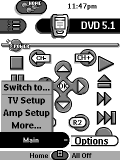 
For: Philips TS-1000 By: Marc Burge | Marc Burge's Popup CCF A work in progress CCF with splash screen popup menus to emulate the Device menu (plus a few others). All buttons from other files. Thanks to those who unknowingly made things easier. |
|
|
Return to the index of all files,
or search for even more files by this author. |
|
|
Share with the remote control community
by uploading a file to Remote Central!
| 









