
The following page was printed from remotecentral.com:
Before you continue!This file area has been replaced with a newer one! This section is no longer being updated and is presented for archival purposes only. As it becomes increasingly out of date, some files may show as unavailable. For free access to all of these downloads and many newer ones, visit our NEW file area at: http://files.remotecentral.com
You are currently browsing through the Philips Pronto & ProntoPRO, Marantz RC5000, RC5200 & RC9200, Onkyo CHAD and Yamaha RAV-2000 file area. To return to the beginning click here. |
|
[ < Back | Next > ]
[ Page: 1 ] |
Sort by: [ Title | Date | Author ] |
|
|
Denon Audio Decoder AVD-2000 For: Philips TS-1000 By: David VanOstrand | Part of a complete system CCF file. |
|
|
Marantz Preamplifier AV-600 For: Philips TS-1000 By: David VanOstrand | Part of a complete system CCF file. |
|
|
Panasonic DVD Player DVD-RP56 (Remote model N2QAHB000012) For: Philips TS-1000 By: David VanOstrand | Part of a complete system CCF file. |
|
|
Samsung HDTV Receiver SIR-T150 For: Philips TS-1000 By: David VanOstrand | Part of a complete system CCF file. |
|
|
TiVo Digital Video Recorder Philips HDR112 For: Philips TS-1000 By: David VanOstrand | Part of a complete system CCF file. |
|
|
Toshiba Television CN32H95 (Remote model CT-9953) For: Philips TS-1000 By: David VanOstrand | Part of a complete system CCF file. |
|
|
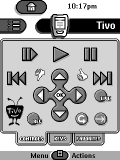 
For: Philips TS-1000 By: David VanOstrand | David VanOstrand's Pronto CCF This is my first posted ccf on the forum and I am very proud of my work. This file is based on Dale's latest Amazing Pronto. Thanks -- I've had my Pronto for over a year and never appreciated it more. It includes a jump feature, a hard button action menu accessible from anywhere, Toshiba inputs Macros, surf macros for TiVos and Toshiba TVs, some custom bitmaps, and a simple on/off scheme. There are no discrete power codes. |
|
|
Return to the index of all files,
or search for even more files by this author. |
|
|
Share with the remote control community
by uploading a file to Remote Central!
| 









