
The following page was printed from remotecentral.com:
Before you continue!This file area has been replaced with a newer one! This section is no longer being updated and is presented for archival purposes only. As it becomes increasingly out of date, some files may show as unavailable. For free access to all of these downloads and many newer ones, visit our NEW file area at: http://files.remotecentral.com
You are currently browsing through the Philips Pronto Professional TSU9800, TSU9600, TSU9400, TSU9300, TSU9200 and Marantz RC9001 file area. To return to the beginning click here. |
|
[ < Back | Next > ]
[ Page: 1 ] |
Sort by: [ Title | Date | Author ] |
|
|
|
|
Denon Tuner TU-1800DAB For: Pronto TSU9400 By: Julian Croot | Part of a complete system XCF file. |
|
|
|
|
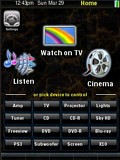 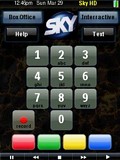
For: Pronto TSU9400 By: Julian Croot | Julian Croot's XCF Changing my old Pronto RU990 to the TSU9400 with its more numerous hard buttons allowed me remove the tabs on each page, and finally make full use of the screen. In this I've made sure all my components' functions fit on 1 page, (with a seperate page for each zone on my AV Amplifier), whilst keeping the button sizes larger and more attractive than I've used before. I've kept the system area as small as is practical.I've also made use of Pronto scripts to cater for short/long presses of the power button (on/off) and page scrolling of the Sky and Freeview TV guides using the rotary wheel. Every device is accessible from the home page, and I've PIN protected power to the projector (The PIN is 5555 on this version). You'll find every IR code you can think of for each of the devices, including the commands used in all 4 zones for the Denon AV amplifier. Hope it's useful. |
|
|
| Return to the index of all files. |
|
|
Share with the remote control community
by uploading a file to Remote Central!
| 









