The following page was printed from RemoteCentral.com:
User reviews for the Harmony 659 / H659 / SST-659 from Logitech.
Ratings
Reviews
MSRP (USD)
Average: 3.91/5.00 Median: 4.33/5.00
88
$199
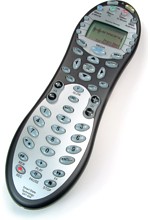
The Harmony H659 remote control features simple Internet-based programming via USB, Smart State control for easy system automatation, full backlighting, a redesigned user interface and a large complement of hard buttons!
The reviewer has used this remote control for 1-3 months.
Review 17 made on Saturday February 21, 2004 at 12:41 AM.
Strengths:
Versatility, activity concept, help function, backlight
Weaknesses:
Lack of macros, inability to prioritize activities in LCD screen, transport controls inconveniently placed, internet interface good, but could be better.
Review:
For us this thing is the cat's pajamas! It has handled all of our remotes including two Tivos (a old Sony and a Series 2), an ancient Mistubishi VCR and an equally ancient Denon surround unit/amp. Yes the Tivo button was not present at first on the Sony device setting, but I added it easily (mapped it to the menu hard button). There were other things that needed correcting or customizing, but fixing them was not a big deal. My wife is a TIVO fiend and she loves this thing. Switching activities is generally flawless and when it misses (usually the operators fault) it is so easy to correct using the help function.
Harmony should maybe back off their ease of use marketing, but I have not found the overall experience to be troublesome. You should expect to spend some time tweeking and going back and forth with this thing and the internet interface. To reiterate what someone else noted, it has worked very well with OS 10.2.8 and now with Panther 10.3.2 - major kudos for supporting the Mac community!
Problem areas: A lack of macros. I can see how Harmony might want to avoid macros since they could conflict with the whole activity concept which is sort a macro funtion in it's own way. Please Please add prioritizing to activites in the LCD screen. This is quite an annoyance and not in keeping with the generally well thought out aspects of this remote. Another ergonomic issue is the transport buttons. Why in the world are they way down at the bottom almost hanging off the edge? They should be directly below the navigation/arrow keys. The transport buttons are so low on the body of the remote that you sometimes have to hold the remote with two hands to operate them effectively.
Let's face it this is a pretty wiggly area Harmony does business in. How many hundreds (thousands?) of different makes and models of remotes are there? Considering this fact Harmony has done a great job with this thing. Some the negative reviews seem to have been written by extraordinarily impatient people. And let's not forget that this is a brand new product. I'm betting that it only gets better with time.
The reviewer has used this remote control for 1-3 months.
Review 16 made on Sunday February 15, 2004 at 9:29 PM.
Strengths:
Feels good, does a bunch. Still wondering about battery life
Weaknesses:
setup. I really wish it was non I-Net enabled. Was a little klunky getting it going. I'd also like a way to save configs. Alos a easy way to write macros. Its promotes "No Macros to write!" but I'd like to. Some interesting items may need to stack a few commands.
Review:
So far I like it. Took longer to set up then I would have wanted it to. An SD card slot, back-ups and macro programing I feel are needed. I was going to build my own remote, but this saved me from that. (at least for the time being)
The reviewer has used this remote control for 1-3 months.
Review 15 made on Thursday February 12, 2004 at 1:10 PM.
Strengths:
Ease of set-up, backlighting ease of use
Weaknesses:
Web site a bit clunky
Review:
I received my remote via web order from NeutronUSA.com ($114). After opening the box and looking at the user guide, I had all my devices in and working in about 45 min. Easiest remote to setup (previous remote is H/K TC1000) I have ever had. A previous review said this remote is mot capable of handling discrete ON/OFF codes, this is not true, my Denon DVD has this and it works just fine. Added a "non standard" activity for switching from digital cable to over-the-air HD viewing, worked fine. I am very pleased with the inital set-up, it will most likly get even better with a bit of tweeking. (ie adjusting speed of IR commands and adding a few dedicated functions to some devices)
The reviewer has used this remote control for 3-6 months.
Review 14 made on Thursday February 12, 2004 at 1:06 AM.
Strengths:
Ergonomics, ease of setup, one button activities, the buttons you need for an activity are there, wife loves it.
Weaknesses:
Backlighting doesn't stay on long enough, buttons aren't perfect.
Review:
My wife's response
"I don't care what it cost, it's worth it".
I did a bit of research after a local retailer made a recommendation on the Harmony, and thought I'd make the plunge. (Most of the time when I've paid that much for a remote, it has come with a TV).
I've got recent HT gear, and setup went smoothly. No web slowness, and the remote worked as promised first time.
It's nice being able to select "Watch TV", and later "Watch DVD", and have the appropriate gear turn on and off, the correct input channels selected, etc., all in one press of a button.
Predictions: Intrigue (the makers of the Harmony Remote) will be bought out within 18 months; the technology used will eventually become standard for Universal Remotes.
The reviewer has used this remote control for 1-3 months.
Review 13 made on Wednesday February 11, 2004 at 7:42 PM.
Strengths:
Ease of use, (not ease ofsetup though), looks, feel, weight, overall form factor. LCD screen. I would well imagine that when/if remote is setup properly that it would perform wonderfully.
Weaknesses:
Setup . I could not complete the setup even with semi responsive Harmony Tech Support Assistance. Very un-user friendly setup, instructions, no pictures online, not intuitive at all. Overall ridiculous/abysmal setup procedure. In addition, there are not enough hard "activities" buttons, as they are called. "Watch Movie"? Who selects that? Try "Watch DVD" and "Watch VCR".
Review:
My HT is not anything out of the ordianry. Sony WEGA TV, Toshiba DVD, Sony VCR, TiVo, Yamaha Receiver. I'm going back to my old reliable, and much easier to setup, Philips Pronto TSU2000.
The reviewer has used this remote control for 1-3 months.
Review 12 made on Saturday February 7, 2004 at 8:34 PM.
Strengths:
Hard keys. Supports "Activities".
Weaknesses:
Internet access required for configuration. Non-standard configurations are difficult. Small hard keys. Too smart for it's own good.
Review:
I tried this out for a day. It installed fairly easily, but it insists on an internet connection. This may make sense since Harmony is able to keep the device/code databases up to date. It uses the interesting concept of "Activities", which is something I tried to program into my original Pronto.
However, I encountered the following problems:
TiVo issues:
1. I have two TiVos, connected via an RF modulator to distribute video throughout the house. It was able to handle the video distribution, but it was unable to handle the cable/satelite combination. (I'm eventually going to cable-only, but this is a limitation.)
2. The default configuration for TiVo's does not define a TiVo button!
3. When you use the Off button, it turns off the TiVo output. This can happen with Sony TiVo's that have a "Power" (really display) toggle. I thought my Sony TiVo crashed (I even unplugged it to reset it). It does allow you to disable this.
Other issues:
4. The "Glow"/backlight stopped working after only a few hours. I even put in fresh batteries.
5. Some devices have a toggle on/off button, but also have discreet codes for on/off (e.g. Sony devices). The Harmony only supports the toggle on/off.
6. If it thinks devices are off, the [Off] button doesn't do anything.
7. It recognized my TV (Pioneer Elite PRO-510HD) as a monitor, despite the fact it has a tuner in it. So, I couldn't program it to "Watch TV" except through the VCR. I had to add the "TV" input myself. However, I was able to set it to use the TiVo's on the RF modulator (channels 120 and 124).
8. It recognized my Receiver (Yamaha HTR-5280/RX-V800) but didn't identify the inputs correctly (inputs were mislabeled and missing).
9. It recognized my DVD player (Sony DVP-CX875P), but not as a jukebox. It thought it only had one disk (really 300). It also didn't work right away, because it supports multiple DVD IR codes (as do Sony CD players). It allows you to change the code set (I had it at two to avoid conflicts with the Sony PS2 DVD controller), but it doesn't ask you up during the programming guide. At first, I thought it didn't recognize the DVD player.
I returned it after 1 afternoon's use. I guess I'll have to get a USB serial adapter to reprogram my Pronto TS1000.