The following page was printed from RemoteCentral.com:
User reviews for the Digital R50 from Universal Remote Control Inc.
Ratings
Reviews
MSRP (USD)
Average: 2.87/5.00 Median: 3.33/5.00
10
$150
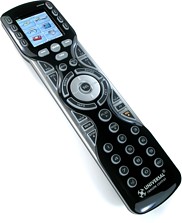
The R50 is the consumer version of the MX-450. It features a vibrant color LCD screen, control over 18 devices, full on-board programming, a favorite channels section, red keypad backlighting, plus nearly unlimited learned codes and macros.
The reviewer has used this remote control for more than two years.
Review 10 made on March 24, 2013.
Also owned:
too many to list...
Strengths:
very solid; easy to use once setup is complete. Macros work well after you finally get good at building them.
Weaknesses:
do not need a manual, though it would be useful to have a little more overview of the design before starting setup. I guarantee you will have one or more false starts before you understand how things can work in your equipment environment. No macro edit feature - have to reprogram from scratch to make a change. I had trouble using it in my HT, which has Xantech IR distribution setup to control equipment in a closet. Couldn't punch through the IR system.
Review:
It worked fine before installing the IR gear. I retasked it to control another TV site with direct beaming to the 5 devices in this location. Works very well here. I got a AR ARRX18G for the HT. It works great there but I hate touch screens! Uses lots of batteries. URC is NOT a consumer-friendly company. They have this crazy idea the people want to pay an "installer" hundreds of $$ to keep their remotes current. I think they would sell more higher-end units if they dealt with consumers. I can set the R50 up in less then 30 minutes now that I am very familiar with it. I tinkered for hours originally getting it the way I wanted it. Macros work well, I have lots of them. They are a little tedious to get set up. If a change occurs, you have to re-entire the entire macro to incorporate it. No edit feature! I want to see an R40's edit feature since I am looking to replace a Logitech 890 my wife uses. I like the R50 where I use it.
The reviewer has used this remote control for under 1 month.
Review 9 made on February 22, 2013.
Also owned:
Harmony 880 and One
Strengths:
None
Weaknesses:
Useability is none due to terrible documentation.
Review:
Bought it for the price and based on reviews thought this would be refreshing. What a mistake. Unless you are a rocket scientist don't go near it. As mentioned in all reviews the "manual" is useless. Nice frisbee but an expensive one.
The reviewer has used this remote control for under 1 month.
Review 8 made on March 23, 2012.
Also owned:
Harmony 650, original harmony, hai touch panels,
Strengths:
Programming without a pc. Seems to be strong IR. layout. Well built
Weaknesses:
Non that I can think of currently
Review:
I was reading the reviews and had some concerns about this remote. It was only $70 so I pulled the trigger. I must say how pleasantly surprised I am by this remote. It's very easy to program and it has not one given me any issues with lost codes, not learning, etc. I set up all the favorites with the inc icons. I think for $70 it's a great deal.
Currently I am only running a tv, runs sound units and cable. I will be adding an Aton A/V switcher for the rooms and a blu ray and Roku.
I need to purchase at least 5 more for the house so everything runs the same and i dont get complaints from the family and for the price you can't beat it.
The reviewer has used this remote control for under 1 month.
Review 7 made on December 29, 2011.
Also owned:
Logitech 650
Strengths:
Looks nice Attractive display AA batteries
Weaknesses:
Forgetful device No update possible to database
Review:
Okay, my old Logitech has been giving me problems so I went with this...what a mistake! It will not retain any learned commands. I repeatedly hd to use the learn function, since using the in unit system was at best cumbersome, more often useless. It would recognize a component, pass the test and immediately not provide the command requested. So back to learning. Button by button! Pick it up a bit later, press "Guide," get "Menu" and no way to back out without going to the original remote! This would be marginally acceptable for a component brand not listed in theire on board database, but these were for components that the remote supposedly recognized. Further, there is no way to update the device to newer components without reprogramming one button at a time from the component's remote.
We have two Channel 3's here, one local and one further away. I initailly programmed teh local one for CBS and the remote reset it to the non-local station. Great for HD, but a pain to get local news.
It's been written that setting up macros was easy. RIGHT! The instruction sheet says, essentially, "just do it." There are no instructions at all. the website doesn't expand on tnhis function. Some forums give a bit of direction, but that's it. Maybe you're setting up a macro. Maybe not. And when you do, the screen icon for a device suggests it is in a macro mode. But you can't tell if you've actually written one.
In short, if you buy this nice looking remote, you're simply adding one more remote to your pile since you will be relying on them to reteach this thing every command xcept ON and OFF. Wait, that makes no sense! Don't buy this.
The reviewer has used this remote control for 1-2 years.
Review 6 made on June 28, 2011.
Also owned:
Harmony 880, 890; Pronto; Acoustic Research XTOUCH; others (many!)
Strengths:
Good looking; not too expensive
Weaknesses:
URC does not like DIY and dealing with end users. Don't even answer emails! Not able to download new device codes; Not able to review/edit macros - it's invisible! Inconsistent operation; does not always work. Buttons have long travel; must be pressed all the way, or nothing happens.
Review:
This device is easy to set up, however I had bad experiences with completeness of device codes. Some buttons did not function for a device - like "PAUSE" on my OPPO Blu Ray player! You need pause on this device! There is no way to update codes. Whatever comes with it is all you ever have. I never did get all functions working for all devices. You have to set up buttons inside devices and make them "learn" from original remotes. This takes forever! At the end, the remote developed a idiosyncrasy requiring you to hold the remote at a 45 degree angle to the IR receiver to be recognized. This became maddening! I finally gave up on the R50 and set it up to replace an aging Harmony 880 in a simpler setup. It works OK there. My other complaint concerns the buttons. They have an unusually long travel, meaning you have to push buttons for a longer distance, and if you don't push them all the way down, nothing happens. I learned a lot about URC during this experience. They try to force owners of their remotes to use custom installers to set up their remotes. If you buy a more complex unit, you may have trouble even getting the setup software. You have to beg the dealer you buy it from to get it for you. If they refuse, you are stuck! A few $hundred every time you change your setup. I programmed mainframe computers for decades. I THINK I can program a stupid remote! Get real, URC. We live in a technological society. I don't recommend this remote except for the most simple application - and then, there are others that work better.
The reviewer has used this remote control for under 1 month.
Review 5 made on June 17, 2011.
Also owned:
HTM MX500
Strengths:
- Great hard button assortment - Good button placement with exceptions noted below - Good button feel with exceptions noted below - Nice overall size and shape - AA batteries - RED backlighting for buttons - Adjustable screen brightness - Low price
Weaknesses:
- Major function buttons and direction pad poorly designed, either too small and/or poorly placed/crowded - Lack of dedicated macro buttons - Only six soft buttons next to LCD screen - LCD screen doesn't remain on, and no soft keys will activate without the screen on - so they all take two presses if screen is off - Even for hard keys, there's a delay - Light button is too recessed and requires much too firm a press to activate
Review:
I've had a Home Theater Master MX500 since they first came out, must be at least eight years now, maybe ten. It's worked flawlessly until about a month ago, when the light ceased to function (the unit still works otherwise). As we're often watching in the dark, this wasn't acceptable. Over the past 8-10 years, I have tested out various remotes in the stores, and never found one remotely as well designed ergonomically as the MX500. After reading the review of the R50 here and elsewhere, I thought I may as well give it a try. I noted that the MX500 is still available, so I could return the R50 and get another MX500 if need be. After a few weeks, I'm still a little torn, but will probably keep the R50. Things I never liked and still don't about the MX500:
- 'Select' key in the middle of the directional pad is extremely difficult to use, even after all these years. We still can't reliably get select instead of a direction. It's to the point where I learn select onto the stop button, but this is only viable for devices that don't use stop! - The things eats batteries like nobody's business. Pretty much every 2-4 months we were having to replace the batteries. Though AAA are cheap, I still find this excessive. - No dedicated Menu, Guide, Info, or Exit buttons - these are grouped in with the transport controls, not really workable, and also not illuminated. The MX500 somewhat made up for this with ten soft keys vs six on the R50, and that's where I put these functions on the MX500.
So, the R50 improves on all of these MX500 weaknesses, thankfully. It uses a separate easy to use select button inside the directional pad. It uses AA batteries which supposedly store 2-3 times as much juice as AAA, so hopefully we won't need to change them nearly as often (and they're the same price). And it has the dedicated Menu, Guide, Info, Exit buttons down near the directional pad, where it is on almost all factory remotes - very nice. Other improvements over the MX500 are:
- Red button backlighting instead of blue. I find the red easier to read and it doesn't mess with your night vision. - You can have the R50 laying on your coffee table and press any button without the remote tipping to the side, as the MX500 does. - Two lines of text next to each soft key, seven characters per line, plus customizable icons for devices on the main menu. This is a huge improvement over the MX500's single line of five characters.
Unfortunately, though these improvements are very welcome and useful, the R50 really drops the ball in terms of basic ergonomics when compared to the MX500. Although to be fair, most all univeral remotes drop the ergonomic ball these days, most of them much farther than the R50 does. You would think of all buttons, URC would choose to get the most used functions right, in terms of button shape, size, placement, etc. While I have no beef with the arrangement of the buttons on the remote - which I find nearly ideal and highly logical, the physical design of primary controls is poor. Although many of these points are brought out well in Mr. Tonks' official review, I feel obligated to point them out again. The volume and channel buttons, along with the skip, FF/REW, and stop/record buttons are all significantly recessed compared to the other hard buttons. The volume and channel buttons remain usable, but only just - nowhere near the excellent feel of the MX500. The skip buttons are tricky to use, which is unfortunate because we use those for our DVR all the time. The FF/RW are even harder to use, requiring great care to execute. Now if this were the only issue it would be sad, but the problems don't stop there. Although the MX500 had a very poor select in the directional pad, the pad itself was a joy to use, pretty much perfect in size, shape, and operation. The R50 has taken a giant step back with it's totally flat directional pad. The pad is extremely difficult to use without hitting either select or one of the Menu/Guide/Info/Exit buttons next to it. The pad itself is just far too small, and my fingers do not really fit in between the center button and the surrounding buttons. If the pad were raised, as it is on the MX500, it would be MUCH easier to operate, or if the pad were contoured, as on almost any other remote. As our Tivo pretty much runs almost exclusively using the directional pad, this is a big letdown. We can get by with a poor select a lot easier than a poor directional pad. I find much of the time I have to use my trigger finger instead of my thumb on the pad to actually make sure I'm hitting the right direction. So I think that about covers the ergonomics. Why companies constantly feel they have to 'fix' things that aren't broken is beyond me. I applaud the few improvements, but never under any circumstances should a product go backwards ergonomically, and this is what the R50 has done. Sadly, this is the case with a majority of new technology from almost any company - flash and form over function and usability.
I really do miss the three dedicated macro buttons of the MX500 which would work from any device screen. Now a macro is at least a two button process, unless for some reason I wanted to program the same macro into the same hard button on every single device - no thanks - and there isn't really a button I'd want to sacrifice that way, anyhow. I do miss the MX500's always on screen (despite the battery eating), because it meant we didn't have to turn on the screen or light to send a soft key command. This is another big drawback to the R50 - any soft key requires two button presses when the screen is off. And, as Mr. Tonks' review mentions, even the regular hard keys have a delay before sending, if pressed when the screen is off. This is big operational drawback in my mind, though it's not excessive. The whole point of having hard keys is that you don't need a screen or to even look at the remote to know what you're doing. Speaking of the screen and lighting, I don't know why URC changed the light button from the MX500's. The button to activate the light on the R50, though in roughly the same place as the MX500, is too recessed into the case and requires about ten times the force to press compared to the MX500. It's basically to the point where you have to specifically hold the remote with one hand and press with the other - you can't reliably activate the light one handed. That's poor design.
All that said, I do like the R50, and can probably get by with it's faults. We are getting used to it. The six soft keys by the screen are not as big a drawback as initially expected, since we now have the Menu/Guide/Info/Exit as hard keys. Programming the unit, as far as learning, editing labels, and creating macros, seemed nearly identical to the MX500 for me, so was a piece of cake. I like the on screen tips, though agree with others that there should be a detailed manual, not the almost non-existent setup guide.
The reviewer has used this remote control for under 1 month.
Review 4 made on October 13, 2009.
Also owned:
MX-500, and lots of cheaper learning remotes (Sony etc)
Strengths:
AA batteries, powerful IR, tons of learning capacity, very simple to learn and operate
Weaknesses:
red backlighting is hard to see and not user adjustable, cannot move keys, very limited selection of icons and text symbols, some buttons recessed and/or too small, some repeated learning necessary.
Review:
I have had my MX-500 for years and absolutely loved it, but it went kaput on me so I decided to try the R-50 as a replacement. I like to set up a remote my own way and am not interested in "activities" nor even macros for that matter. Call me old fashioned. I set up my components by selecting pre-programmed codes and it was very easy. Ofcourse, the buttons are NOT where I think they should be and I cannot move them. However, the R-50 does let you text edit and learn so I ended up being able to change programmed buttons and learn new commands where necessary to work around this. I would guess it saved me about one third the time compared to learning the whole thing from scratch. I have encountered some problems that I never did with my MX-500. First is having to re-learn commands even though they apparently were learned successfully the first time. Second, for some reason I cannot learn my lighting (up and down) to the channel up/down keys on each device. I like to be able to control lighting regardless of which menu I am in (like volume). I have Light device set up and tried to copy to all others....unsuccessful. Then I tried to learn this to each other device.....also unsuccessful. Unfortunately, I can only use the Channel Up and Down buttons to control my lighting in the MAIN menu or the LIGHTS menu. I will keep trying to learn to the other devices but I'm not hopeful. Like others have commented here, the button layout leaves a bit to be desired. I do find at times that I have to press hard, or at a different angle, sometimes to get a response. This was never the case with my MX-500. Also, I hate the red backlighting for the keys as I find it difficult to read the buttons. The white light of the MX-500 was so much better. Bottom line, the R-50 does all I want it too, looks great, and is easy to set up. If I had to use this all the time, I might be a bit more harsh, but I only use it in my thaeter so I can live with the minor inconveniences. If URC do some tweaks to the button layout, backlighting and add some more text symbols and icons, they will have a real winner. And I agree, hey URC, give us a pdf downloadable manual for frack sakes!













 Return to the user reviews index...
