
10/10/25 - It’s been so long since we’ve last seen you!
10/24/22 - In searching for the perfect day, Timmy discovers something unexpected!
9/04/22 - That childhood favorite is back in a new Timmy video.
7/31/22 - It’s time for my second new Just Like Timmy video!
7/12/22 - Why not check out my new YouTube animation channel, Just Like Timmy!
|
|
 |
|
|
The following page was printed from RemoteCentral.com:
| User reviews for the Harmony 1000 from Logitech. |
 | | Ratings | Reviews | MSRP (USD) |
Average: 3.00/5.00
Median: 3.33/5.00 | 7 | $499.99 |
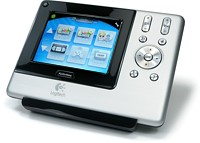
The Harmony 1000 is the first color touchscreen remote from Logitech. It features a brilliant 3.5" LCD, RF control of IR equipment, a rechargable lithium ion battery, good selection of hard buttons, USB connection for Internet-based setup, plus the company's propreitary activity-based control for up to 15 devices with Smart State Technology.
Get it
at: |  |
|
|
| Written by Wolfman91 from Minnesota. The reviewer has used this remote control for under 1 month. |
| Review 2 made on Sunday March 18, 2007 at 10:37 PM. |
| Also owned: |
| Strengths: |
| Weaknesses: |
|
| Review: | I was very excited to get my hands on the H-1000; it is a beautiful and lightweight remote at a great price point.
The screen is bright and the touchscreen works well. The battery life is poor at best; off the dock it will last only half a day which is really no issue as it will be docked most of the time anyway. No real issue for normal use.
The remote should serve you well on both on IR and RF if you actually get it programmed.
The issue I have with the remote is to get it to that point of usability, especially when using RF extenders.
The software is simply sub-standard. It registers the remote as a network device (TCP/IP) even though it is using USB. This has caused problems to recognize the remote. Once beyond that hurdle, Logitech requires multiple versions if you have different remotes (7.0.2 for the 890Pro, 7.1.4 for the H-1000 and 7.2 for the 890). Imagine that neither remote can be programmed with the other version (for example the H-1000 with 7.2) and unless you have multiple computers, you must uninstall/reinstall the software each time you want to program a different remote.
If you only have one remote, this may not be a problem for you, just be aware. The major hurdle besides the absence of numerous customization options that the Pronto has (custom buttons, button macros) you can simply not test your setup as you can with the Pronto's for example.
When using RF, this trial and error can kill countless hours. Here is an example: I use 2 RF extenders for that remote. Since the purpose of these extenders is to control devices hidden in cabinets or in other locations you can assume that the extenders will not be quickly accessible. Yet this is exactly what you need to do.
You can set every device to be controlled via IR or RF (including which extender and extender port). That's great. What is not is that any change made to the programming of the remote requires a complete reprogramming of the remote AND the two extenders. (even if only a single IR command is changed that is not using the extenders.
Since the extenders must be unplugged from power and plugged into the USB port of the computer for programming (extenders are powered by a small brick and are hardwired-the power cord can't be removed from the extender), you will undo the setup in your cabinet just for an update. Then you program the extenders, program the remote (an easy 6-8 minutes for 3 devices) and put everything together again to test.
If it's not perfect, you will have to rip it all apart again to update the components again. A removable power cord would be great especially as the power outlets are in the back of the cabinet.
Which brings me to another issue; learning codes. In my case, I was setting up a couple of devices that are not as common. A Barco 808s projector with a controller and a Netstreams Musica system. The remote database didn't know the Musica and had non-working database setting for the Barco. It simply didn't work for the Barco and for the Musica (and Apple remote) it had real problems with repeat codes (buttons on the remote that perform different or repeated tasks when held longer)
Since you have to go through the ordeal mentioned above even when changing a single button, this turned out to be very frustrating.
I realize that I am ranting here, but programming a Pronto doing the same thing is a breeze and produces better results.
In short, this remote is handicapped by poor software and should only serve you well with simple configurations and commonly used consumer electronics. It is not very usable for advanced setups.
|
|
Quality:   | Features: | Value: |
|
|
|
| Written by shakedog from hawaii. The reviewer has used this remote control for under 1 month. |
| Review 1 made on Saturday March 17, 2007 at 12:59 PM. |
| Also owned: |
| Strengths: |
| Weaknesses: |
|
| Review: | I am a fairly new A/V contractor and chose this as my first mid to high end remote based off the recommendations of several other individuals in the audio/video field. I installed a Harmony 890 very recently and was met with numerous issues that ultimately resulted in 5+ hours of programming and tech support. I never did get the RF extender to work. I was not pleased when the support tech admitted that the 890 had a reputation for being "buggy." It's not an easy thing to explain to a client why you're scratching your head calling customer support and completing the same tasks over and over again and not getting anywhere. Part of that however, was due to the fact that his internet connection was slow. Also, since he purchased all the equipment before hiring me to do the install, I was pretty much left to fit all the crappy stuff he bought together. Ultimately we decided to toss some of the existing components and buy some new equipment. The harmony 890 was on my list of highly recommended items to discard based on the poor reviews it received, but we ultimately decided to give it a-go. Anyhow, without further ado, the review on the 1000.
The Harmony 1000 model differed significantly from the 890 from a programming standpoint. Although the core programming methods remained the same, the software was updated significantly over the 890 to effectively prevent users from becomming lost in a sea of programming hell. The newer software makes one feel like they are being directed as opposed to being thrust into the middle of the program without a life raft or any direction whatsoever.
Unfortunately, I believe there are some software related errors as the USB LAN LINK tends to become unstable, going from "this device is working correctly" to disappearing entirely from the Network settings window. I cannot understand why a network needed to be setup to make data transfers possible. Why the 1000 is not setup as a simple plug and play storage device is beyond me. It is also possible that data transfer issues are coming from the 1000 since its not uncommon for the remote software updater to come back with a "no response from the device." This is liable to drive anyone crazy since the connection is just not consistent. It almost seems to be a matter of luck when and if the remote's software gets updated.
Before I begin to sing the 1000's praises I have one more nagging gripe. Setting up the RF is one hell of a chore, even in light of the easier programming software. After 20 minutes of messing around with settings, updating both the extender and the remote, using the remote's own help button, restarting the computer to restart the LAN by USB connections (which by the way are supposed to be plug and play), and setting up the RF network (mind you I am a personal computer tech to everyone I know and am very, very familiar with the antics of the common PC), I was able to get the RF feature to work. Unfortunately, trying to add an IR only device after the RF network started to work properly resulted in the RF network completely failing. I am currently trying to do the whole "remove and add" process for the RF extender, but a seemingly simple process has turned into a nightmare on account of the data transfer issue.
All programming headaches aside, I found the remote's interface extremely intuitive. Custom installers looking to offer easy demos to clients will be extremely pleased. I was also impressed by the bang-for-the-buck factor. For approximately 400 dollars you get a touchscreen with gorgeous graphics, all the necessary hard buttons without going overboard and cluttering up the remote with heaps of ugly buttons, a very tastefully designed housing with a subtle blue glowing backlight, and what appears to be brushed aluminum outter casing. Remote comes with a craddle to charge the battery and hotdamn will you need it since the 1000 sucks battery power like my dodge ram sucks gas.
Setting up activities is a no brainer. Programming to WATCH A DVD or WATCH TV and setting up all the power and input buttons properly is no problem at all. Customizing each activity or device to learn a button from the original remote is no hassle either. Renaming buttons and activities is simple. I really like the layouts of each screen as well although some of the touchscreen buttons do seem unnessesarily close to each other, even when there is plenty of screen space to distance them from each other a little more.
I believe that if logitech can fix the software updating issues and the rf network connectivity problems they would truly have a superior remote on their hands. While I am a bit pissed that the programming is such a friggin' headache, I feel good knowing that once everything is in place, my clients will be pleased with how easy it is to use the 1000. |
|
| Quality: | Features: | Value: |
|
|
|
|
|









 Return to the user reviews index...