|
Sony VisionTouch
Folks with an older Sony receiver who have just purchased a brand new learning remote may ask "why wont my new universal remote learn any codes from my receiver?"
The very first thing you should check is your receiver. See if the word "VisionTouch" is printed on the faceplate, if the model number ends with "G", or if it came with the "Air-Egg" remote. If any of the above items is true, chances are you are the proud owner of one of Sony’s infamous VisionTouch (aka CAV) controlled systems. The short answer to your problem is that almost no learning remote can work with a VisionTouch receiver.
A longer explanation is that the VisionTouch system uses a 455KHz carrier frequency which, though sounding compatible with many learning remotes, uses a completely unique IR protocol that it is unlearnable by almost every universal remote to date, including the Philips Pronto and Sony's own models. The problem extends in that you can’t use "normal" Sony remotes or IR codes to control the receiver – even the Sony RM-AV3000 will not work.
Affected models include:
STR-DA90ESG
STR-DE805G
STR-DE815G
STR-DE905G |
STR-DE1015G
STR-D760Z
STR-G1ES
STR-G3
|
STR-GA9ESG
TA-VE800G
TA-VE810G |
If you own one of these models, your options are: (a) Buy a One For All remote manufactuered after 2003 which will contain a preprogrammed code set; (b) continue using the original remote alongside a universal for the rest of the system; (c) buy a new receiver; (d) buy a Philips Pronto, build a special IR demodulator cable and download the VistionTouch CCF file (more information in that file); or (e) spend the money on a custom programmed remote control from RTI, which are the only other remotes that can control VisionTouch directly.
Sony’s receivers advertised with "2-way communications" are fully compatible with regular learning remotes. Sony dropped the entire VisionTouch system from their lineup some time ago, probably due in part to these aftermarket incompatibilities.

High Frequency IR Systems
Several brands of equipment feature IR systems that operate at frequencies much higher than normal. Though the overwhelming majority of IR remotes operate in the 30-56KHz range, normally 38-40KHz, several brands such as a Bang & Olufsen, particular Kenwood equipment and some lighting control systems use a 455KHz frequency.
More unusual and difficult to work are Pioneer & Pioneer Elite components built around 1997 that use a 1.125MHz carrier frequency. While many modern learning remotes can learn 455KHz, the only model that can also cover 1.125MHz is the now outdated Marantz RC2000 MkII, which features IR learning up to 1.125MHz (the original Marantz RC2000 will not work). No learning remote before or since has the capability to work at such high frequencies (as nothing before or since has required it). Owners of affected Pioneer equipment have a simpler solution, though: they may also use regular Pioneer 40KHz codes from older and newer equipment.
While all models of the Philips Pronto are only capable of learning up to about 56KHz, the original Pronto "classic" also has the ability to send at much high frequencies. However, Philips has devised a way where they can capture certain high-frequency B&O and Kenwood codes, through a trick where the remote "guesses" what the code should be via information received low-frequency, then matches it up to a high-frequency database version. Codes not previously decoded by Philips cannot be learned. If you only need 455KHz coverage for B&O devices in an economical remote, most of Sony's newer models are capable of capturing up to 500KHz.
Older Pace Cable Boxes
Having trouble getting your Pace cable box to operate with your snazzy new learning universal remote control? Well, you might have one of Pace's infamous "IRDA" boxes. What happened is Pace, for their 1000 and 2000 series digital cable boxes, designed a remote control using a protocol not actually intended for remote control use. The IRDA variant they used was intended for high-speed data transfer over short distances (ie. from a laptop to a printer), rather than the slow-speed/long distance requirement of remote controls. The IRDA standard specifically includes a format for remote controls; Pace decided to ignore it.
The issue is that trying to learn such codes is much like asking an AM radio to receive FM signals - it simply isn't possible. At this time, the only remote controls that can offer even partial functionality are certain models from One For All. Even then you'll most likely have to ship the remote off to the factory in order for these codes to be added. TiVo is also apparantly releasing a converter for control of these devices. More recent - and older - Pace models are not affected by this problematic protocol.
Parity & Toggle Bits
A somewhat common problem is when a device (such as a cable box) will accept a learned code once but not twice in a row. For instance, you can enter the channel "1 - 2", but not "3 - 3". This is not a fault with your new remote, but rather a very hard to work with design employed by your equipment.
What happens is your original remote tacks on a "parity bit" (sometimes called a "toggle bit") to the end of each code. So, the first time it sends the code it follows up with a "0". The next time it ends with "1". The problem is that a learning remote can only learn or send the signal one way – the way it learned it. Your equipment, unfortunately, will not accept the code again unless it ends with a new parity bit or you send a different code to clear the memory buffer.
The most common example of equipment that uses this system is anything that employs the Philips RC5 or RC6 code format - such as Philips or Marantz products, or even Microsoft Media Center Edition remote controls. As the RC5 and RC6 implementation guidelines make parity bit checking optional, not all RC5/RC6 devices will respond the same way to non-alternating learned codes. Some may require parity bits at all times, some may only require it for certain commands (such as "power"), some may use the parity bit only for closely repeated commands (meaning you could send "3-3-3" quickly with the original remote but only slower using a learned code), while some ignore parity bits completely and show no noticable operational difference with or without.
The Philips Pronto is the only remote that I am aware of that can learn codes with alternating parity bits in the method required for several (not all) brands of equipment. If you have one that is not yet covered you can try tacking on a "do-nothing" code after each real one. So, your button for "3" would send the "3" code followed by another code to clear the buffer. What can that code be? Anything that the equipment senses as a real code but doesn’t affect operation. It may be next to impossible to find such a code.
If the brand is supported, most preprogrammed remotes will properly send parity bits. For example, database codes in the Home Theater Master MX-500 or MX-700) will work correctly with parity bits, but learned codes will not. For other universal remotes, there is not much you can do for this problem.
Bluetooth Devices
If you're reading this entry, then you undoubtedly own a Sony Playstation 3. The PS3 is the only audio/video device on the market that uses Bluetooth as it's primary (and alas only) control technology. Unfortunantly, this presents a problem for universal remote control owners: there are no universal remotes designed to operate Bluetooth devices!
Sony's lack of support for standard CIR (Consumer Infrared) has irked universal remote control owners everywhere, enough so that there are now a wide range of adapters designed specifically to convert normal infrared commands into Bluetooth functions that the PS3 understands.
For more information on these adapters, please see our Sony PlayStation 3 Advanced Control Roundup. Also available are less expensive (and less capable) infrared-to-USB adapters. For more on those, see the PS3's entry in the Consumer Electronics Control Wiki.
RF Satellites
For anyone attempting to consolidate all of their remotes into a single unit, satellite systems can pose a potentially major problem: radio frequency (or RF) through-the-wall controls. As satellite receivers are one of the few mainstream audio/visual devices manufactured today using this technology, IR universal remotes do not include RF support.
Satellite receivers come with either an RF-only remote or an RF and IR remote. In the former case you should contact your manufacturer to determine if your model still has IR capability (most today do), in which case you can purchase a new remote or capture the codes from another pre-programmed model. For the latter, you may have to make a choice between RF or IR – most receivers cannot operate with both activated at the same time. This adjustment will be found in the receiver’s setup screens and will probably have to be toggled before the remote will transmit IR signals.
In the unlikely event that your receiver does not include any infrared support, you will need to continue controlling it via the original remote.
Other RF Equiment
All other Radio Frequency equipment, such as most older Bose systems, cannot be controlled by any universal remote currently in existence. Don't be confused by remotes advertising RF capability – this is not for the control of RF devices, but rather for controlling IR components from other rooms. The remote sends an RF signal to a basestation in the same room as your equipment, which then rebroadcasts it as infrared. There is no way to consolidate control of an RF-only device into a third-party remote, learning or otherwise.
X-10 Automation
If you’re currently using a wireless remote to control your X-10 home automation system it’s most likely transmitting via RF signals (as described above) to a transceiver. The transceiver plugs into the wall and re-sends commands as actual X-10 signals through your home's electrical wiring. If you wish to use a universal remote to control your system, you will need to purchase an IR to X-10 transceiver which takes IR signals from your remote and rebroadcasts them directly as X-10.
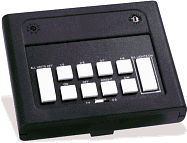 The only such economical device that I’m aware of is the IR543 (which is re-branded to various other names and sold by many companies). It is a small black console unit with white buttons on the top for manual control of up to 8 devices on a particular house code. Note that the console can only control one house code at a time and that the IR codes remain the same no matter which code it is set to – making it nearly impossible to work with more than one house code at a time. (Note that a more expensive model, the IR543AH, is available which will operate all house codes.)
Many inexpensive pre-programmed remotes include compatible X-10 codes. Pronto users can download a complete X-10 CCF file for control of a full 16 modules. Owners of other learning remotes may wish to purchase an inexpensive X-10 IR remote direct from their X-10 dealer to capture codes.
Remember that X-10 is not an RF-based technology. You can control it via a radio frequency remote, just as you can with an infrared one. X-10 actually sends commands through the electrical wiring in your house. This means that any X-10 transmitter plugs into the wall, including the IR543 IR-to-X10 controller mentioned above, as well as RF-to-X10 and manual pushbutton-to-X10 consoles.
European owners of the Philips Pronto NG RU950 remote controls are in a special situation - since the localized RF frequencies of the RU950 and X-10 RF transcievers are identical, it's possible to use the built-in RF section of the RU950 to operate those transceivers (thus avoiding the purchase of an IR transceiver). An appropriate PCF file with codes is available on this site.
- Daniel Tonks (Remote Central)
| 










