
The following page was printed from RemoteCentral.com:
Before you continue!This file area has been replaced with a newer one! As of 2011, this section is no longer being updated, and some files may show as unavailable. For free access to all of these downloads and many newer ones, visit our NEW file area at: http://files.remotecentral.com
You are currently browsing through the Philips Pronto NG TSU3000, TSU3500, RU950, RU960, ProntoPro NG TSU7000, TSU7500, RU980, RU990, Marantz RC5400 & RC9500 file area. To return to the beginning click here. |
|
|
|
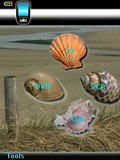 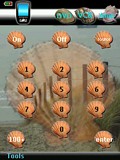
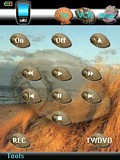 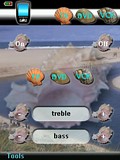
For: Philips ProntoPro NG By: Rona Wittner | Contest Entry #21: Seashells With this file I wanted to demonstrate the usage of animations. The theme that is chosen is based on the seashore. Four types of shells are used to represent the four devices TV, VCR, DVD and Amp. They are presented right away on the home page.All devices have their own sea shore background. The buttons on each device are small versions of the shells to get a uniform look and feel. The top bar shows the other devices for quick selection.The animations are implemented as macros (in hidden devices) with a series of page jumps. The following animations are included:
- When a shell is selected on the home page this one becomes enlarged on the background. The others move to their place in the top bar.
- In a device page press the Home hardkey and the same animation is played backwards.
- In a device page select another device from the top bar and this one becomes the center. This is not a separate animation. Instead it just executes the Home macro and then the device selection macro from the home page.
- There is a fifth animation, but that one you have to find for yourself!Background bitmaps are created from photographic material found on the internet and... (more) |
|
|
More TSU7000 PCF Contest Entries: [ < Back | Next > ]
Return to the Complete System Setup Files index. |
|
|
Share with the remote control community
by uploading a file to Remote Central!
| 









